NL Design — User Guide
NL Design is a Nextcloud app that gives your Nextcloud the look and feel of your organisation. It supports all major Dutch municipalities, provinces, and national government organisations — just pick yours from a list and you're done.
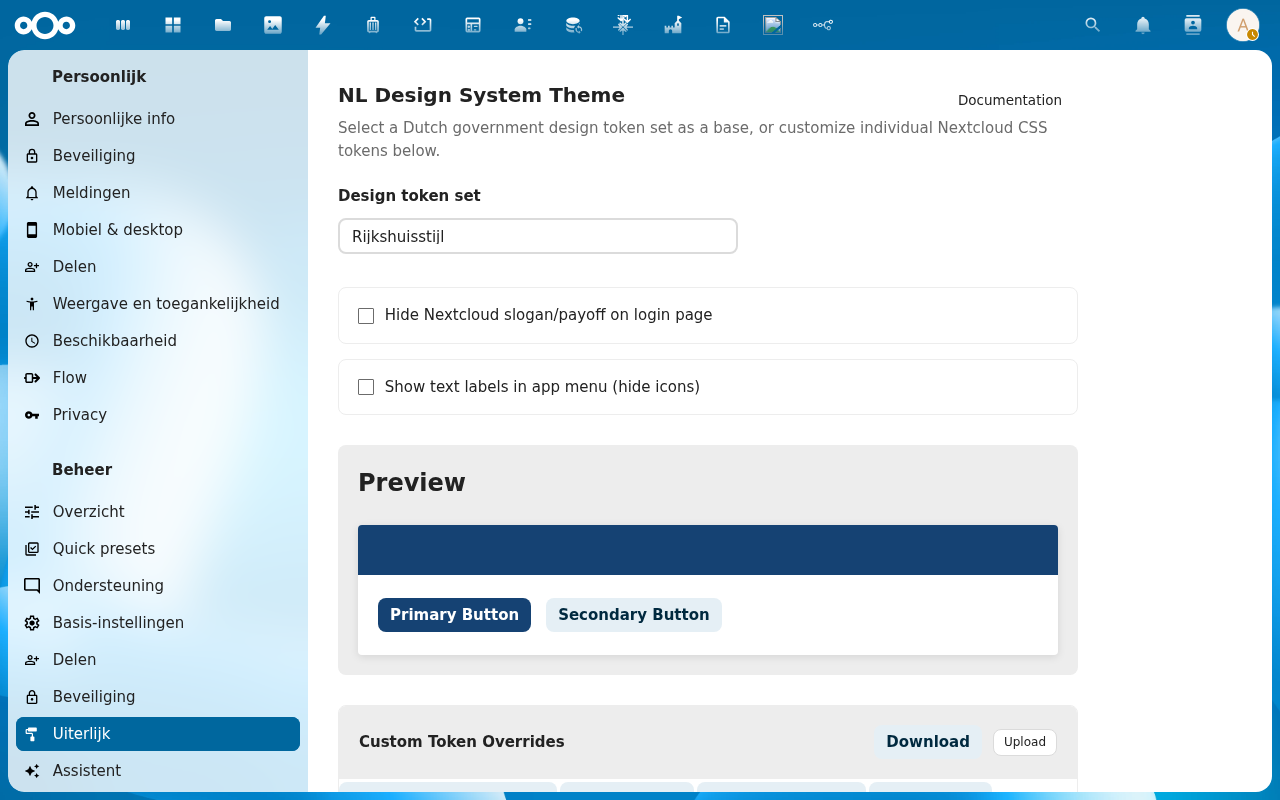
What you can do with it
- Apply your organisation's house style — pick from 39 pre-built themes including Rijkshuisstijl, Gemeente Utrecht, Gemeente Amsterdam, Den Haag, Rotterdam, and many more
- Preview the result instantly — the preview section updates as soon as you make a selection
- Fine-tune individual colours — if the theme isn't quite right, you can adjust specific colours in the token editor without touching any code
- Export and import your settings — download your customisations as a file and share them with another instance
Who should read this guide
This guide is for Nextcloud administrators who want to apply their organisation's branding. You don't need any technical knowledge — if you can log in to Nextcloud's admin panel, you can use NL Design.
Where to start
- Install the app — takes about a minute via the Nextcloud App Store
- Choose your theme — select your organisation from the dropdown and save
- Fine-tune if needed — optionally adjust individual colours using the token editor